Question:
I am trying to delete the play arrow of a video on the thumbnail. Is this possible?
Answer:
In step 3, Options tab, click Advanced Options button, then enter the following text to the Advanced Options field:
data-navshowplayvideo="false"
Recently Asked Questions and WordPress Tutorials
Question:
I am trying to delete the play arrow of a video on the thumbnail. Is this possible?
Answer:
In step 3, Options tab, click Advanced Options button, then enter the following text to the Advanced Options field:
data-navshowplayvideo="false"
Question:
I need to change the picture radius value to get a perfect square…how do I have to get this. I am using the skin Simplicity.
Answer:
In Step 3, Options tab, click Skin Options button, then find the following code, and remove the red text:
#amazingcarousel-CAROUSELID .amazingcarousel-image img {
display: block;
width: 100%;
max-width: 100%;
border: 0;
margin: 0;
padding: 0;
-moz-border-radius: 4px;
-webkit-border-radius: 4px;
border-radius: 4px;
-moz-box-shadow: 0 1px 4px rgba(0, 0, 0, 0.2);
-webkit-box-shadow: 0 1px 4px rgba(0, 0, 0, 0.2);
box-shadow: 0 1px 4px rgba(0, 0, 0, 0.2);
}
Questions:
Hello,
we have a small problem with your plugin.
All titles of our added YouTube videos are not showing in the
gallery on the website.
It shows the title of the picture file of the chosen video and not
the title that we put in the WordPress backend on "title".
Answer:
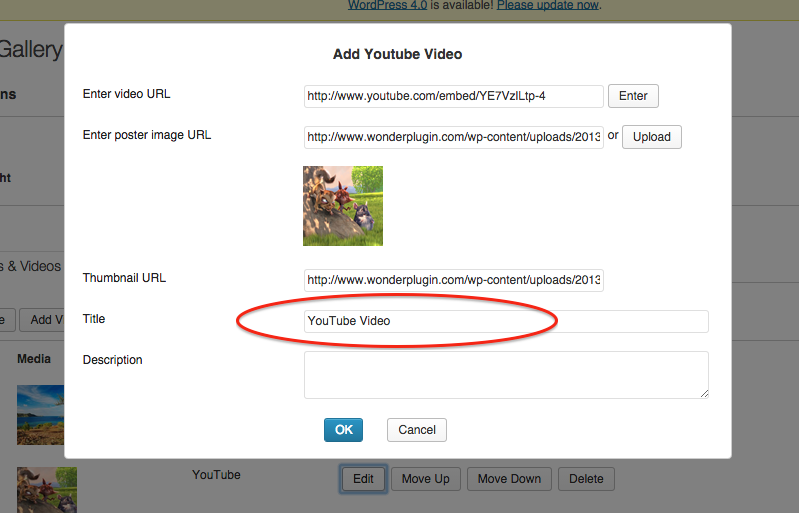
In the plugin, Step 1, Images & Videos tab, when you add/edit the video, you can edit the title to whatever you like.
Question:
I am working for my client to build a WP site and they have purchased the Wonderplugin Video Gallery Commercial plugin. I have activated it and want to reduce the text size in the Title. I have attached a screengrab to this email, as the site is on a test site and cannot be viewed by anyone but me yet. Can you please let me know what to do?
Answer:
In Step 3, Options tab, click Advanced Options button, then enter the following text to the Advanced Options field:
data-titlecss="{color:#ffffff; font-size:12px; font-family:Armata, sans-serif, Arial; overflow:hidden; white-space:normal; text-align:left; padding:10px 0px;}"
data-descriptioncss="{color:#ffffff; font-size:10px; font-family:Armata, sans-serif, Arial; overflow:hidden; white-space:normal; text-align:left; padding:0px 0px 10px 0px;}"
A demo is as following:
Question:
Is there way to place the play button not in the middle, but in some other place on the video?
Answer:
Yes. In step 3, Options tab, click the Advanced Option button, then enter the following CSS code to the Custom CSS:
.amazingcarousel-play-video {
background-position: bottom left !important;
}
This will move the play video button to the bottom left.
A demo is as following:
Question:
Good day!
Hi, I wanted to ask if how can I display the description in gallery page? It only displays the title. Im using WordPress 3.9.2 and free version of WonderPlugin Grid Gallery.
Answer:
You can display the description in the Lightbox popup:
In step 4, Options tab, Lightbox Options, there is an option "Show description".
Question:
I have a website in progress, I used Wonderplugin for WordPress and as I came across on the development, I cannot get it working.
I already uploaded images and configured everything on WordPress.
I also copied the shortcode to the php page that I am working on. But the carousel does not show up.
Answer:
Normally this problem is that there are multiple jQuery files added to your WordPress.
You can view the HTML source code of your webpage, and check how many jQuery are added in your website. In Google Chrome, you can view the HTML source code with menu View -> Developer -> View Source, then search text "jquery" in the source code.
There should be only one jQuery in the webpage, which is added by the WordPress system.
Some plugins add their own jQuery to the website, and this is not correct. A plugin should always use the system installed jQuery, and the js files added from a plugin will be added after the system jQuery.
A jQuery will destroy all other jQuery functions that are added before it. So if a plugin adds its own jQuery, it may destroy other jQuery functions.
To fix the issue:
In the plugin, Setting menu, you can try to check the option "Add plugin js scripts to the footer". This option will place the plugin js file to the footer and will fix the problem in most cases.
If the above option is not working, you can try to disable all other plugins and see whether the WonderPlugin works. If it works, you can then enable the plugins one by one, and find the plugin that has caused the problem.
If WonderPlugin is still not working after you have disabled all other plugins, then the extra jQuery may have been added manually to the theme or the page, you need to find the code and remove it.

Question:
I am using the WonderPlugin Gallery Version 2.0.
Is there a way to show the description of the video under the video being played in the gallery ? I am using the Vertical Skin.
Thanks
Answer:
Yes, in step 2, Options tab, click the button Advanced Options, then enter the following text to the right side Advanced Options field:
data-showdescription="true" data-titleheight="80"
A demo is as following:
Question:
I'm wondering if there is a __LINK__ var or else as there are are for TITLE and DESCRIPTION carrousel item
I'm trying to manage a specific content template and i would like to use such a variable.
Maybe it is available in the last carrousel version ?
Answer:
A macro variable __HREF__ is supported in the latest version 2.2.
For example, you can use the following code in step 3, Options tab, Content template:
<div class="amazingcarousel-image">__IMAGE__</div> <div class="amazingcarousel-title">__TITLE__</div> <p class="amazingcarousel-readmore"><a href="__HREF__" target="_blank">Read More</a></p>
A demo with the above template is as following:
Question:
I am setting up the Lightbox for Video Commercial version on a clients' site and wondered if there was any way to change the default size?
The Lightbox is responsive but comes in at 960x540 default.
Answer
You can use data tag data-width and data-height to change the default size, for example:
<a href="http://www.youtube.com/embed/YE7VzlLtp-4" class="wplightbox" title="Big Buck Bunny Copyright Blender Foundation" data-width="1024" data-height="576">YouTube Lightbox</a>